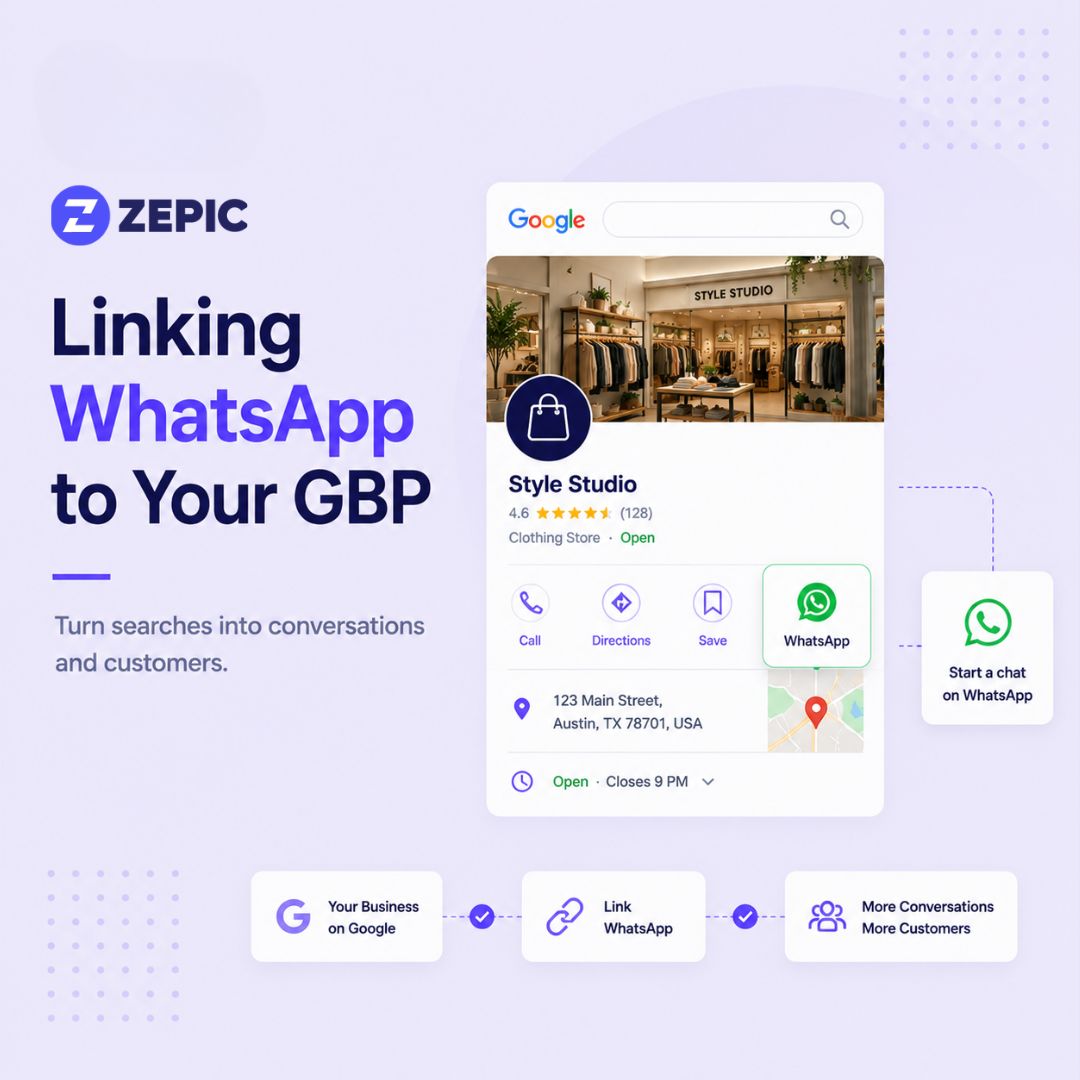
Adding WhatsApp to your Google Business Profile gives local shoppers a direct way to contact your store.
WhatsApp reduces friction by letting customers ask questions without making a phone call or filling out a contact form.
Retail teams can use WhatsApp to verify stock, share product images, recommend products, and coordinate reservations.
WhatsApp chatbots can automate common questions and collect customer details before handing conversations to store associates.
Multi-location retailers can use WhatsApp Business APIs and centralized routing to manage conversations across individual stores.
Fast responses, automated flows, and clear handoffs can help turn high-intent local searches into store visits and sales.
Integrating WhatsApp directly into your Google Business Profile creates a direct channel between local searchers and your retail store counter. When shoppers search for products nearby on Google Search or Maps, adding a WhatsApp chat option allows them to initiate real-time conversations with a single tap.
Google enables claimed and verified Business Profiles to connect third-party messaging services directly inside listing contact settings. Adding this feature captures immediate buyer intent before a shopper clicks away to a competitor.
How to Connect Your WhatsApp to Google Business Profile
Step-by-Step Setup Guide
Connecting WhatsApp to your profile requires only a few minutes inside your Google account settings.
Step 1: Log in to the Google account managing your verified Google Business Profile.
Step 2: Open Google Search or Maps and search for your exact store name to access the manager panel.
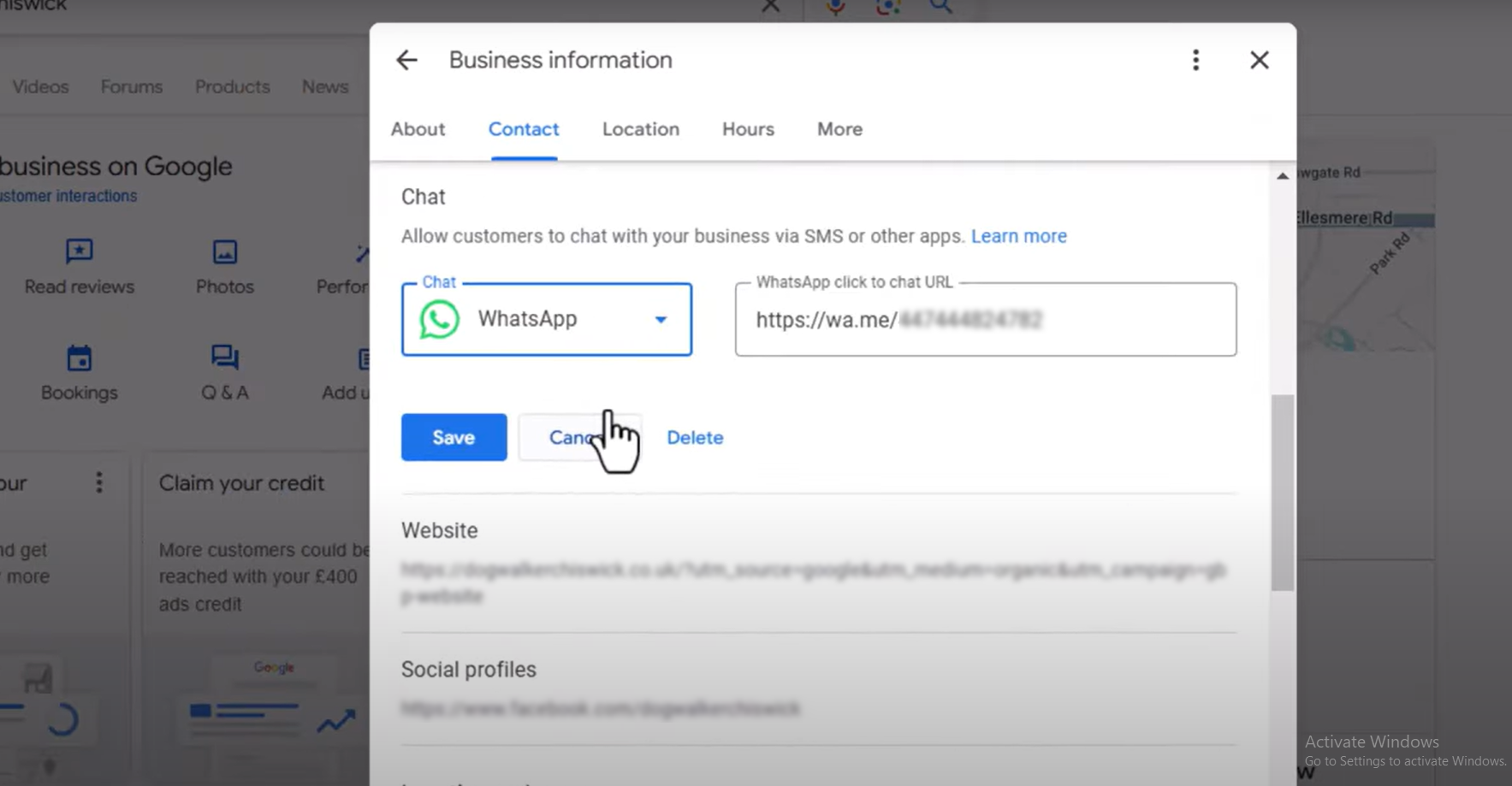
Step 3: Click Edit Profile, then select the Contact tab.
Step 4: Navigate to the Chat section and click the drop-down arrow.
Step 5: Select WhatsApp from the platform options.
Step 6: Enter your full WhatsApp Business phone number in international format (e.g., +1234567890) or input your custom WhatsApp click-to-chat URL.
Step 7: Click Save and test the button from a separate mobile device to verify link redirection.
Multi-Location Implementation Strategy
Retail brands operating multiple store branches must organize WhatsApp access so customer inquiries reach the correct local store team.
Dedicated Store Numbers: Assign distinct mobile numbers running separate WhatsApp Business accounts to each individual store profile. This ensures local employees answer inquiries about local inventory.
Centralized WhatsApp API Routing: Enterprise retail chains can utilize the WhatsApp Cloud API connected to customer service management tools. Inquiries coming from individual Google listings route automatically to regional customer support teams or specific store desks based on location tags.
Consistent Response Guidelines: Provide brand templates across all branches to maintain a unified brand voice. Establish response time targets (such as replying within 15 minutes during operating hours) for all store managers.
Benefits of Adding WhatsApp to Your Retail Store’s GBP
Shoppers browsing local map results demand quick answers. Connecting WhatsApp to your profile replaces slow contact forms and phone tags with direct personal conversation.
1. Zero-Friction First Contact
Traditional phone calls require immediate staff availability, while website contact forms introduce multi-step friction. Clicking a WhatsApp link opens a familiar chat interface on the customer's mobile device without requiring them to save your store number to their contact book. A WhatsApp chatbot can take this a step further by instantly answering common questions, collecting product details, and guiding shoppers to the right information before a store associate steps in.
2. Rich Media Sharing for Retail
WhatsApp lets your store team share high-resolution product photos, short video clips of display shelves, audio notes, live location pins, and direct payment links directly within the conversation.
3. Asynchronous Customer Communication
Unlike phone calls that require both parties to speak simultaneously, WhatsApp messaging lets your staff manage inquiries between customer checkouts. Shoppers can send questions during a busy commute and review your store's reply whenever convenient.
4. Direct Conversion of High-Intent Traffic
Local searchers opening a chat usually have high intent to purchase. Providing rapid answers regarding stock status or store policies converts map browsers into foot traffic faster than static webpage text.
Communication Channel Comparison
Channel
Response Expectation
Media Capabilities
Conversion Potential
Staff Effort
WhatsApp
Instant to 15 mins
High (Photos, Videos, Links, Catalog)
High
Low (Asynchronous)
Phone Calls
Immediate
None (Voice only)
Moderate
High (Disrupts counter sales)
Email / Contact Forms
24 to 48 hours
Moderate (Attachments)
Low
Low
Standard SMS
1 to 2 hours
Text only
Moderate
Low
Real-World Retail Use Cases
Reserve-in-Store and Stock Verification
Shoppers often spot an item online and want absolute confirmation that it is available before making a trip.
Scenario: A customer searches for "waterproof hiking boots near me" on Google Maps and finds your outdoor store profile.
Action: The shopper taps the WhatsApp button to ask if you carry a specific size 10 boot in stock.
Outcome: Your store associate snaps a quick photo of the box on the shelf and holds it at the cash register for 2 hours, securing the local sale.
Visual Product Recommendations
Customers shopping for home decor, fashion apparel, or gifts need to see the product before deciding to visit your store.
Scenario: A local shopper searches for "nursery armchairs" on Google Search.
Action: The customer starts a chat asking which fabric colors are currently on display in your showroom.
Outcome: Your sales team sends three photos of display chairs alongside product links, encouraging the shopper to visit your store that afternoon.
Post-Purchase Repair and Service Tracking
Retail businesses offering repairs, alterations, or custom assembly can streamline customer status updates.
Scenario: A client leaves a vintage watch for servicing at your jewelry store.
Action: Your repair technician updates the customer via WhatsApp when parts arrive and attaches a photo of the completed restoration.
Outcome: The customer picks up the item promptly and leaves a 5-star Google review praising the transparent communication.
Best Practices for WhatsApp Business Profile Management
Setting up WhatsApp on your profile is the first step. Operating the account efficiently ensures high customer satisfaction without overwhelming store associates.
Use the WhatsApp Business API: Connect your store's WhatsApp number through the WhatsApp Business Platform to enable integrations with customer engagement platforms, CRMs, inventory systems, and chatbot tools. This makes it easier to manage conversations at scale, especially for multi-location retailers.
Set Up a WhatsApp Chatbot: Automate responses to common questions about store hours, product availability, pricing, directions, returns, and reservations. A WhatsApp chatbot can collect basic customer details and hand the conversation to a store associate when human assistance is needed.
Configure Automated Greetings: Build an instant greeting message that triggers when a customer sends their first inquiry.
Example Greeting: "Thanks for reaching out to Cascade Outdoor Gear! How can our team help you today? If you are asking about product availability, feel free to drop the item name or size below."
Set Away Messages for After Hours: Program automated away messages to manage customer expectations when your shop closes for the evening.
Example Away Message: "Thanks for your message! Our storefront is currently closed. We open tomorrow at 9:00 AM and will reply to your message first thing in the morning."
Build Quick Reply Shortcuts: Save pre-written responses for repetitive questions such as parking directions, return policies, or store hours. Using shortcuts like /parking allows staff to send clear, detailed answers in seconds.
Organize Chats with Labels: Use WhatsApp Business labels to tag active chats by stage (e.g., "Stock Check," "Item Reserved," "Awaiting Pickup," "Payment Pending"). Labels keep multi-tasking retail staff organized during busy store hours.
Adding WhatsApp to your Google Business Profile gives local shoppers a faster way to connect with your store when purchase intent is high. From checking inventory and sharing product photos to answering questions and reserving items, WhatsApp can help turn local searches into store visits.
For retailers managing multiple locations or high volumes of customer inquiries, combining WhatsApp with automation and chatbots can make these conversations easier to manage at scale. With the right setup, your GBP becomes more than a store listing. It becomes a direct channel for customer engagement and conversions.
Is adding WhatsApp to a Google Business Profile free?
Yes. Google does not charge any fees for adding WhatsApp chat links to your listing, and standard WhatsApp Business accounts operate without subscription costs.
What happens if a customer messages outside of regular store hours?
Configure automated away messages inside your WhatsApp Business settings. Set an automatic reply stating your regular operating hours and confirming that your team will answer the message first thing the next morning.
Can multi-location retail chains use different WhatsApp numbers for each store?
Yes. Each store profile in Google Business Manager operates independently, allowing you to assign specific local store mobile numbers or dedicated team numbers to each location listing.
Will adding WhatsApp replace the standard phone call button on my profile?
No. Your phone call button remains fully visible alongside your website link, directions button, and WhatsApp chat option, giving shoppers multiple choices to connect.
Can customers see my personal phone number if I use WhatsApp?
If you link a personal phone number, that number becomes visible to chat users. Use a dedicated store mobile line or a landline number registered to WhatsApp Business to keep personal communication separate.
How quickly should retail store staff reply to WhatsApp messages?
Aim to reply within 5 to 15 minutes during business hours. Quick responses capitalize on high purchase intent while shoppers remain actively looking at local alternatives.





%201.png)