TL;DR
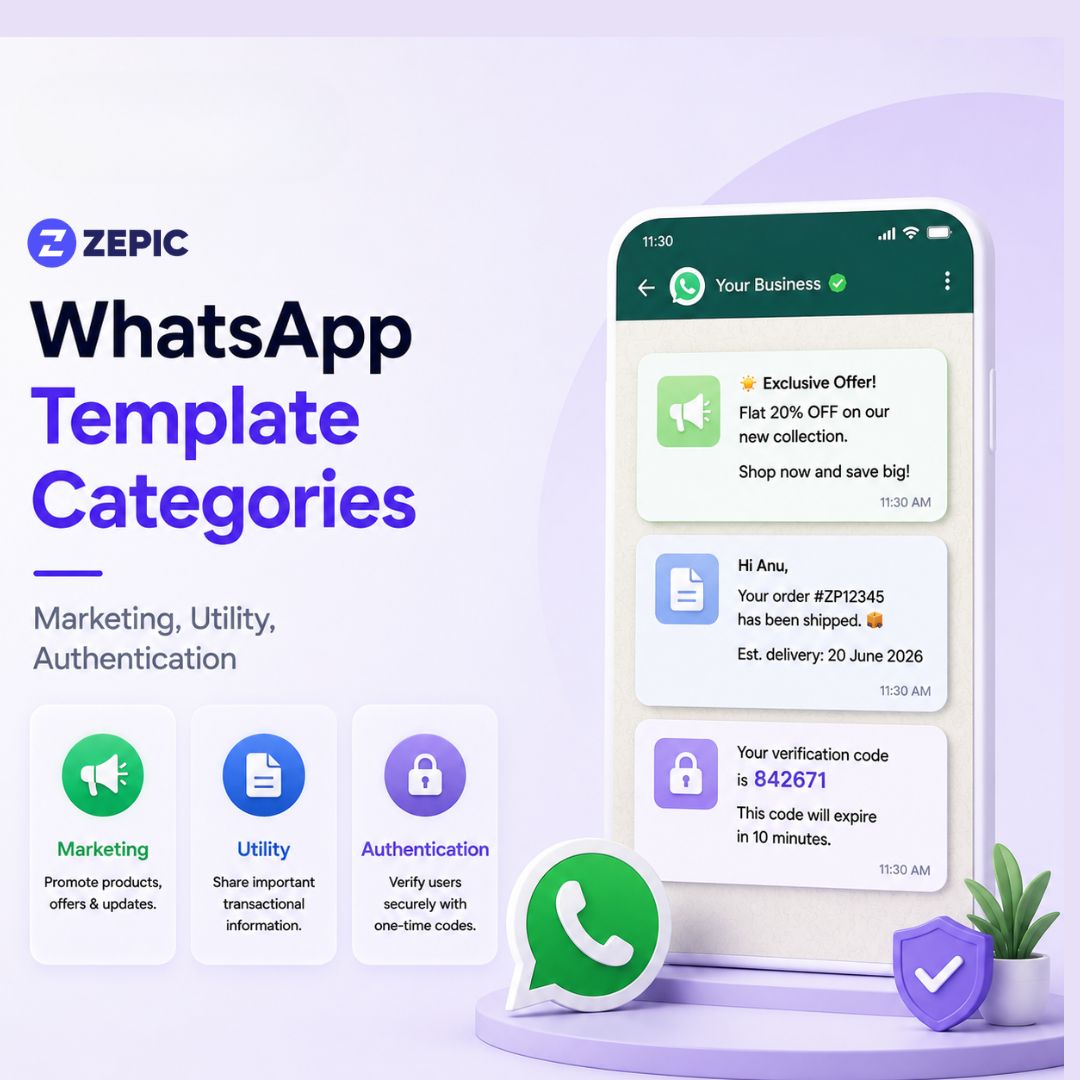
- WhatsApp Business API uses three template categories: Marketing, Utility, and Authentication, and choosing the wrong category can lead to rejections, higher costs, or lower account quality.
- Marketing templates are designed for promotions, product launches, abandoned cart reminders, newsletters, and customer re-engagement, but are subject to quality pacing and should include an easy opt-out option.
- Utility templates deliver transactional updates such as order confirmations, shipping notifications, billing alerts, and appointment reminders, and must remain strictly non-promotional.
- Authentication templates are reserved exclusively for OTPs, login verification, password resets, and account security messages, with the strictest formatting requirements.
When communicating with a global audience, matching the right message with the right channel determines the success of your digital campaigns. The WhatsApp Business API is at the forefront of modern engagement. According to global communication benchmarks, WhatsApp messages have an average 98% open rate, with nearly 45% to 60% of recipients actively clicking through and interacting with the content.
Building a broadcast strategy on this platform requires a solid understanding of structural compliance. A business cannot send an open-ended, free-form text message to a consumer out of nowhere. Instead, every business-initiated message must be built as a structured, pre-approved layout known as a message template.
Meta enforces this pre-approval protocol to preserve user experience and prevent unsolicited spam. Every template submitted to the platform is evaluated by automated systems and sorted into one of three distinct WhatsApp template categories: Marketing, Utility, or Authentication.
Choosing the wrong category can lead to sudden template rejections, lowered account quality ratings, or unexpected spikes in your communication budget. So let’s understand the different template categories.
Why WhatsApp Template Categories Matter in 2026
Meta introduced structural modifications to the WhatsApp Business API ecosystem that changed how companies plan their digital communication investments. The legacy per-conversation model, which bundled multiple messages within a 24-hour window under a single flat rate, is obsolete.
Meta migrated the network architecture to a per-template-message pricing system. Under this framework, your business pays for each template individually at the exact point of delivery. Utility templates migrated to this billing system first, followed shortly after by marketing templates. Today, your chosen category acts as the primary financial lever for your conversational campaigns.
A marketing message has a significantly higher cost tier compared to a utility message. Meta uses an automated AI classifier to inspect the explicit text of every template submission. If your message copy states that an item has shipped but ends with a promotional discount code, the platform will automatically reclassify it or reject it immediately.
Three Types of WhatsApp Templates
1. Marketing Templates: Driving Engagement and Revenue
Marketing templates are the most flexible tools in your messaging toolbox. They include any business-initiated communication designed to drive commercial action, build brand awareness, or re-engage past buyers. This category has the highest delivery rate charges.
Common use cases include:
- Promotional Campaigns: Seasonal flash sales, holiday discount coupons, and exclusive product launches.
- Customer Lifecycle Nudges: Abandoned cart recovery alerts, personalized product recommendations, and customer win-back offers.
- Content Distribution: Monthly brand newsletters, informational company updates, and event invitations.
- Feedback and Loyalty: Customer satisfaction surveys, review requests, and milestone rewards.
Strict Validation Policies and Quality Pacing
Because promotional messages carry a higher risk of user complaints, Meta applies a protective delivery policy to marketing templates called template quality pacing.
When you launch an approved marketing template to a massive subscriber database, Meta does not distribute it to all the millions of recipients instantly. The platform sends the template to a small, isolated test sample of your audience first. It tracks real-time customer behavior signals, specifically looking for block rates and spam reports.
If your test audience responds with a high volume of negative signals, Meta will throttle your delivery speed or pause the template completely. If a template stays in the "Active, Low Quality" tier for seven consecutive days, it is permanently disabled.
To protect your template quality score, every marketing message must include a highly visible, frictionless opt-out mechanism. This can be built as a quick reply button at the bottom of the layout, giving users an immediate way to say "Stop Messages" or "Opt Out" without reporting your business number as spam.
5 Marketing Template Examples
- Abandoned Cart Recovery:
Header: 🛒 Your cart is waiting!
Body: Hi {{1}}, we noticed you left some amazing items in your shopping cart. We have saved them for you! Complete your order today and get your items delivered right to your doorstep.
Buttons: [Shop Now (URL)], [Opt Out (Quick Reply)] - Seasonal Promotion:
Header: 🔥 Festival Flash Sale
Body: Hello {{1}}, our biggest sale of the season is officially live! Enjoy a flat discount on our entire collection for the next 24 hours. Use the code provided at checkout to redeem your savings.
Buttons: [Redeem Offer (URL)], [Unsubscribe (Quick Reply)] - Product Launch:
Header: 🚀 It's Finally Here
Body: Hi {{1}}, meet the brand new {{2}}. Engineered for maximum efficiency and styled for comfort. Click below to explore the full specifications and order yours today.
Buttons: [View Details (URL)], [Stop Alerts (Quick Reply)] - Customer Win-Back:
Body: Hello {{1}}, we miss you! It has been a while since your last visit, so we added a special gift credit to your profile account. Tap below to see what is new.
Buttons: [Claim Credit (URL)], [Opt Out (Quick Reply)] - Event Invitation:
Header: 📅 You are Invited!
Body: Hi {{1}}, join us for our exclusive live masterclass on {{2}} at {{3}}. Space is strictly limited, so secure your virtual seat right now.
Buttons: [Register Now (URL)], [No Thanks (Quick Reply)]
2. Utility Templates
Utility templates focus on essential, non-promotional information. They support a business transaction that has already been initiated by the consumer. Customers expect these updates, which results in exceptionally low spam report metrics.
Core Characteristics and Operational Scope
A specific, explicit user action or request must trigger a utility message. The tone of a utility template must remain completely objective, factual, and neutral. It provides the customer with transactional transparency regarding their active account, purchase, or subscription.
Common use cases include:
- Order Fulfilment Alerts: Purchase confirmations, digital payment receipts, and order cancellation summaries.
- Logistics and Shipping Updates: Real-time tracking numbers, delivery arrival alerts, and missed delivery notifications.
- Account and Billing Management: Monthly billing statements, payment failure alerts, low balance reminders, and subscription renewal timelines.
- Appointment Coordination: Schedule confirmations, booking updates, and calendar reminders.
The Most Common Template Mix-Up
The most frequent compliance error made by brands involves the mixing of utility and marketing content within a single template string.
Meta uses automated NLP (Natural Language Processing) systems to scan every word of your template body. If your message contains even a single sentence of promotional material, the entire layout is immediately shifted into the marketing category.
Let’s look at an example: "Your order #1024 has been successfully shipped and will arrive on Friday. Use code FREESHIP for your next order!"
Even though 90% of that message handles logistics, the final phrase introduces a commercial offer. Meta will classify this text under the marketing category, forcing you to pay the highest rate tier for a standard shipping update.
To preserve your messaging budget, you must strictly separate your operational notifications from your promotional outreach. Send a clean, factual utility message for the order update. If you want to offer a discount, trigger a distinct marketing template at a separate time.
5 Utility Template Examples
- Order Confirmation:
Body: Hi {{1}}, your order ID {{2}} has been successfully processed and confirmed. We are preparing your items for shipment and will notify you as soon as they leave our facility. Thank you for shopping with us!
Buttons: [View Order Status (URL)] - Shipping Tracking Update:
Body: Hello {{1}}, great news! Your package from order {{2}} has been shipped out via {{3}}. You can monitor your real-time tracking route using the number {{4}}. Expected delivery is scheduled for {{5}}.
Buttons: [Track Package (URL)] - Appointment Reminder:
Body: Hi {{1}}, this is a friendly reminder that your upcoming appointment for {{2}} is confirmed for {{3}} at {{4}}. Please arrive 10 minutes early. If you need to make changes, tap the option below.
Buttons: [Reschedule Appointment (URL)] - Payment Failure Alert:
Body: Urgent: Hello {{1}}, we were unable to process your automated monthly subscription payment for account {{2}}. To prevent any interruption to your service, please update your billing details using the secure link below.
Buttons: [Update Billing (URL)] - Support Ticket Resolved:
Body: Hi {{1}}, our customer support team has marked your assistance ticket #{{2}} as resolved. The official solution notes have been updated on your dashboard profile. If you require further help, please reply directly to this thread.
Buttons: [View Support Ticket (URL)]
3. Authentication Templates: Securing Identity Verification
Authentication templates handle security. They are used exclusively to deliver one-time passcodes (OTPs), login validation numbers, account recovery codes, and verification steps.
Hard Operational Boundaries and Fixed Layouts
The structural guidelines for authentication templates are the most restrictive on the entire WhatsApp network. You cannot write custom prose or express unique branding styles inside this category. Instead, Meta requires businesses to use its pre-formatted content blocks.
The strict layout rules include:
- Zero Rich Media Elements: You are not allowed to attach images, video links, or document files.
- Zero Hyperlinks and Emojis: You cannot include website URLs within the text block, and emojis are blocked entirely.
- Variable Length Limits: Any text placeholder variable used inside the body text has a strict maximum length limit of 15 characters.
- Mandatory Action Button: Every authentication template must feature a dedicated interactive button. This must be a standardized "Copy Code" button or an automated "One-Tap Autofill" button that communicates directly with mobile operating systems.
Because authentication messages are time-sensitive and critical for account access, Meta routes them through specialized high-priority network lanes to guarantee instant delivery.
Standardized Layout Variations
Authentication messages follow fixed linguistic structures, with optional additions for security warnings or expiration timelines:
- Standard Verification Code:
Body: {{1}} is your verification code.
Buttons: [Copy Code] - Security Disclaimer Addition:
Body: {{1}} is your secure validation code. For your personal security, do not share this passcode with anyone else.
Buttons: [Copy Code] - Expiration Timeline Addition:
Body: {{1}} is your account verification code. This passcode will officially expire in 15 minutes.
Buttons: [Copy Code]
Technical Anatomy of an Approved WhatsApp Message Template
Every message template across these categories is assembled using a strict hierarchical architecture. Understanding this structural breakdown allows your technical team to build compliant layouts that pass Meta's automated validation checks on the first attempt.
1. The Header Component (Optional)
The header is at the top of your message. It supports static text up to 60 characters or rich media elements. Marketing and utility templates allow you to attach high-resolution images, descriptive PDFs, or short video guides here. Authentication templates completely block this component.
2. The Body Component (Mandatory)
This is the core content zone of your message, supporting a maximum of 1,024 characters. You can use dynamic variables formatted as {{1}}, {{2}}, and {{3}} to inject personalized values like names, invoice numbers, or event dates at the moment of broadcast execution.
Your variables must follow a perfect sequential order. Leaving an orphaned variable or placing two variables directly adjacent to one another without an intervening space will result in immediate system rejection.
3. The Footer Component (Optional)
The footer allows you to add minor text up to 60 characters in a muted grey font color. This zone is typically used for copyright lines, legal disclaimers, or standard unsubscribe instructions.
4. Interactive Buttons (Optional)
Buttons drive engagement by eliminating the need for a user to type a manual reply. You can deploy two types of buttons:
- Quick Replies: Static options that send a preset text reply back to your chat automation system when tapped.
- Call-to-Action (CTA): Interactive elements that trigger a direct phone call or open a tracking link inside an external mobile browser window.
Structural Comparison Matrix
To summarize the operational boundaries of the WhatsApp Business API, review this structural comparison framework mapping out components, constraints, and pricing trends across all three template variations.
| Evaluation Attribute |
Marketing Templates |
Utility Templates |
Authentication Templates |
| Primary Structural Purpose |
Driving conversions, commercial outreach, and brand engagement. |
Delivering operational updates tied to an ongoing transaction. |
Sending secure verification passcodes and login OTPs. |
| Media Attachments |
Fully supported (Images, MP4 Videos, PDF Documents). |
Supported strictly for factual context (Invoices, Product Manuals). |
Completely forbidden by network policy. |
| URL Hyperlinks |
Allowed in the body text or inside interactive CTA buttons. |
Allowed exclusively for active transactional tracking or support. |
Completely blocked from use. |
| Emoji Integration |
Encouraged to boost visual interaction. |
Allowed if used in a professional, neutral context. |
Prohibited across all body content. |
| Button Infrastructure |
Up to 10 buttons (Quick Replies, Marketing Links). |
Up to 10 buttons focused on actions like account management. |
Limited to standardized Copy Code or Autofill buttons. |
| Relative Meta Pricing Tier |
Highest baseline rate tier per delivered message. |
Moderate cost tier per delivered message. |
Lowest baseline rate tier per delivered message. |
Master Your Conversational Strategy with ZEPIC
When you align your messaging strategy with Meta's compliance guidelines, you avoid unexpected pricing penalties and ensure your audience receives a smooth communication experience.
To keep your conversational strategy efficient, focus on these final execution pillars:
- Keep promotional terms out of transactional notifications to prevent forced category updates.
- Use clear, quick reply buttons to give users an immediate way to opt out of marketing broadcasts.
- Use standard formatting blocks for authentication codes to ensure high-priority delivery.
Managing compliance manually across thousands of customer journeys can slow down your growth.
ZEPIC simplifies this entire process for your business.
Sign up for a demo with ZEPIC today to streamline your customer engagement and maximize your messaging ROI.
Frequently Asked Questions
What are the three categories of WhatsApp templates?
The WhatsApp Business API supports three official categories of business-initiated templates: Marketing, Utility, and Authentication. Any outbound message sent outside the standard 24-hour customer service window must be submitted under one of these approved template categories before it can be delivered.
Why was my WhatsApp utility template rejected or reclassified?
Meta may reject or automatically reclassify a utility template if it includes promotional language, discount codes, or sales-oriented messaging. Utility templates are intended solely for transactional communications related to an existing customer interaction, such as order updates or appointment confirmations. Promotional content can cause the template to be reclassified as a Marketing template, which carries different approval requirements and pricing.
How does Meta charge for WhatsApp Business template messages?
Meta charges WhatsApp Business template messages on a per-message basis. Pricing varies depending on the recipient's country and the template category being used. Marketing templates generally have the highest messaging cost, Utility templates fall in the middle, and Authentication templates typically have the lowest pricing because they are limited to security-related use cases.
Can a business modify an approved WhatsApp template?
Yes. Businesses can edit approved WhatsApp templates from their management dashboard. However, any changes to the message content, variables, or structure require the template to be submitted for Meta's review again. During this process, the template may be reclassified, quality-rated differently, or temporarily unavailable until approval is completed.
What happens if my WhatsApp business number receives high block rates?
If a significant number of recipients block or report your business after receiving WhatsApp messages, your phone number's quality rating may decline from High to Medium or Low. A lower quality rating can reduce your messaging limits, restrict campaign scale, and, in severe cases, temporarily suspend outbound messaging until customer engagement and quality metrics improve.





%201.png)


.png)