TLDR:
- Most WhatsApp carousel campaigns underperform due to poor design, weak copy, confusing narratives, and avoidable template approval issues.
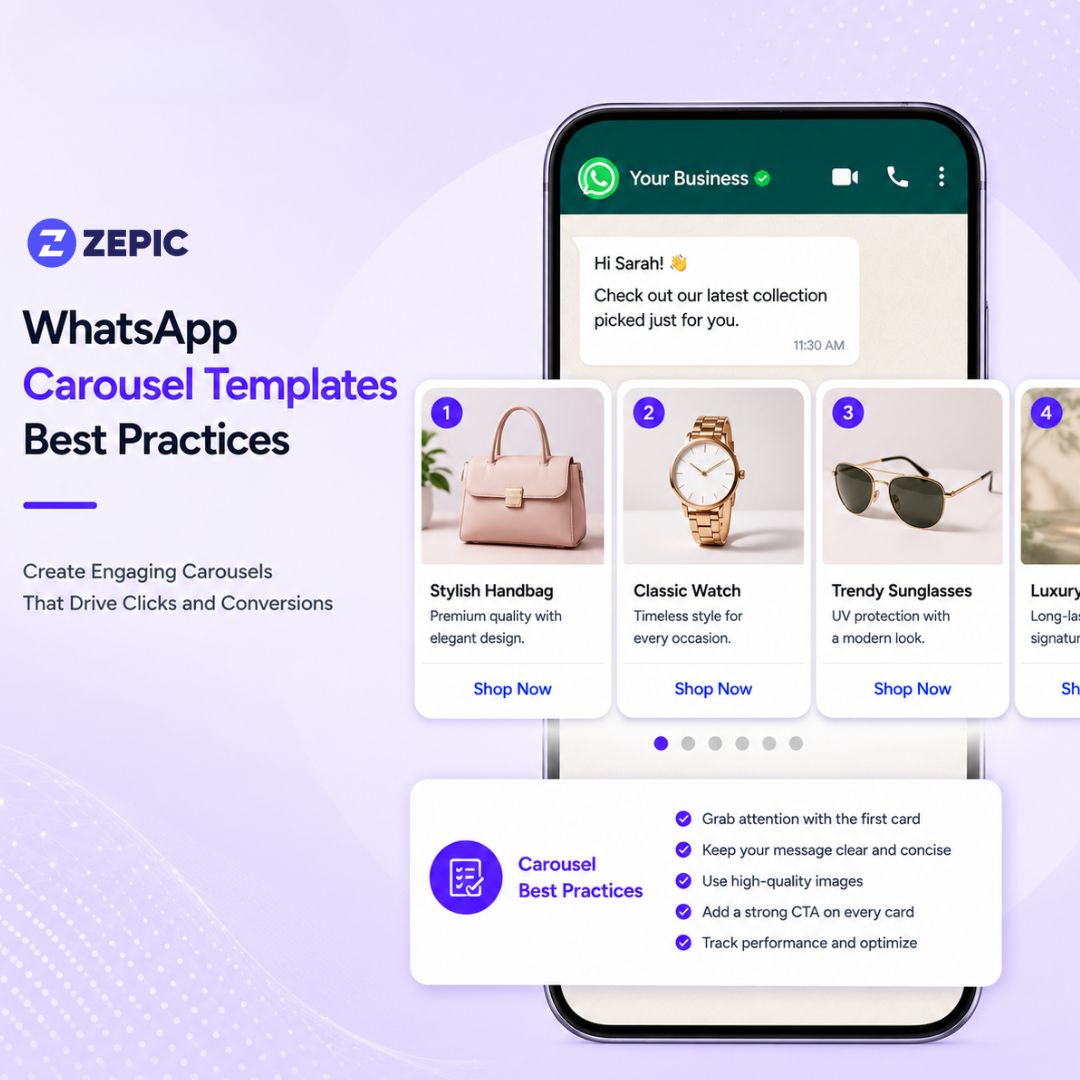
- Carousel templates support 2–10 cards, but 4–5 cards typically deliver the best engagement; performance drops significantly after the first few cards.
- Every card must contain a media header, body text, and up to two buttons, while all cards must use the same media type (all images or all videos).
- Images should be designed specifically for the 1.91:1 landscape format (1125×600px) and optimized for fast loading.
- Card 1 is the most important because it is guaranteed to be seen, so it should contain the strongest visual or offer.
- Copy should be concise, benefit-driven, and independently understandable on each card, since users may not view the carousel sequentially.
- The 160-character limit per card means marketers should focus on outcomes, urgency, social proof, or value rather than detailed product descriptions.
- CTA buttons should use clear action verbs such as “Shop Now,” “Book a Slot,” or “See Pricing,” and link directly to the relevant product or landing page.
- The message bubble above the carousel should act as a short hook that provides context, highlights the offer, and encourages users to swipe.
- Consistency is critical: button types, button counts, media formats, and visual styling must remain uniform across all cards.
- Common approval issues include mixing images and videos, inconsistent button structures, placing URLs in card text, or ending body text with a variable placeholder.
Many marketing teams launch WhatsApp carousel campaigns expecting instant engagement, only to watch their click-through rates stall at a disappointing 8%. On the surface, a low-performing carousel looks identical to a campaign that achieves a 35% click-through rate. The massive performance gap comes down to hidden execution failures.
Marketers frequently treat the carousel format like a standard email newsletter or a static social media banner, completely ignoring the unique technical constraints and visual elements of conversational apps.
When a carousel campaign underperforms, it’s most likely because of these issues:
- Visual and layout friction: Using standard product photography that does not fit the specific landscape dimensions leaves awkward dead space or crops out essential product details.
- Forced narrative progression: Writing copy that requires a customer to swipe through five or six cards to understand the main offer fails instantly. Most users only look at the first few options before moving on.
- Frequent template rejections: Minor structural mistakes, such as mixing images with videos or using inconsistent buttons across different cards, cause Meta to reject the template entirely. This hinders marketing timelines for 24 to 48 hours per resubmission cycle.
To help you eliminate these friction points, we’ve outlined best practices for WhatsApp carousel templates to maximize user engagement. Let’s get into it.
The Technical Specs
Even if your copy is creative and the image is stunning, your WhatsApp carousel can still fail if the technical foundation isn’t strong.
If you’re wondering how to create WhatsApp carousel templates, start by understanding the technical requirements.
The Message Bubble (Text Above the Carousel)
- Character Limit: 1,024 characters.
- Formatting: Supports variables (e.g., {{1}} for personalization), bold, italic, and strikethrough.
- Best Practice: Keep this block to 1-2 lines. The message bubble is the setup, while the cards hold the core content. It is more like an email subject line that drives attention to the detailed content
Carousel Cards
- Card Volume: Minimum of 2 cards and a maximum of 10 cards.
- Components: Each card requires a media header, body text, and up to 2 buttons.
Media Header
- Supported Formats: Image (JPG/PNG, max 5MB) or video (MP4, max 16MB).
- Uniformity Rule: Media types cannot be mixed. Your carousel must feature all images or all videos.
- Dimensions: 1125 × 600px (1.91:1 aspect ratio) for Business API carousels to meet WhatsApp carousel image size and format standards.
- Performance Benchmark: Keep image file sizes under 1MB. Smaller files ensure faster delivery and fewer drop-offs on mobile connections.
- Video Rule: Keep videos under 30 seconds. Meta uses the first frame as the preview thumbnail, so make sure it is visually compelling.
Card Body Text
- Hard Limit: 160 characters per card.
- Formatting: Supports variables for personalization.
- Link Rule: No URLs are allowed in the body text. All links must live inside the CTA buttons.
Buttons
- Supported Types: URL (Visit Website), Phone Number (Call), or Quick Reply.
- Consistency Rule: Button type and total count must be completely identical across all cards.
- Character Limit: 25 characters per button label.
Card Count for Your WhatsApp Carousel Campaigns
While Meta allows up to 10 cards, the ideal number is almost always lower. Engagement drops significantly after the first 3-4 cards for cold or moderately warm audiences. Most clicks come from Cards 1-3, regardless of total count. Adding cards beyond what the specific use case requires can dilute your content.
Use this decision framework to determine how many cards a WhatsApp carousel should have:
| Card Count |
Best For |
Strategy |
| 2-3 Cards |
A/B-style comparisons, before and after previews, two-tier offers. |
Keeps choices binary and minimizes decision friction. |
| 4-5 Cards |
Curated collections, top-selling products, tailored gifting guides. |
Provides balanced variety without overwhelming the shopper. |
| 6-8 Cards |
Category-wide sales, seasonal lookbooks, multi-step stories. |
Requires strong visual progression to maintain interest. |
| 9-10 Cards |
Deep product catalogs or independent offer segments. |
Use only when every single card is independently relevant. |
A tighter carousel with 5 high-quality cards consistently outperforms a padded carousel with 9 cards.
The Exception: High-volume sales events where every single card represents a distinct, independently compelling offer (such as different product categories or unique price points) justify an 8-10 card layout. Each card must stand completely on its own as a compelling reason to click.
WhatsApp Carousel Design Best Practices
Images do the heavy lifting for mobile engagement. If your visual assets are poorly cropped or inconsistent, users will exit the chat. Follow these WhatsApp carousel design best practices to keep users scrolling:
- Design specifically for the landscape format: Carousel images render at a 1.91:1 aspect ratio. This is entirely different from standard square or portrait product photography. Repurposing square product shots into a landscape frame leaves dead space or cuts off critical details. Always design directly to the format or crop intentionally with the focal point centered.
- Maintain rigid visual consistency: Consistency means coherent design across all cards. Use the same lighting style, background treatment, text overlay placement, and brand color palette. A carousel where Card 1 is a clean white-background studio shot, and Card 3 is a dark lifestyle photo, looks disorganized.
- Place your strongest asset on Card 1: Card 1 is the only card every recipient is guaranteed to see. It is the hook that determines whether they swipe. Put your highest-quality, most desire-generating visual asset here.
- Keep text overlays in the safe zone: If you add text to images (such as price callouts or offer labels), keep them centered in the middle 60% of the image. The card body text area and mobile reply bars will overlay the edges of the image on certain devices.
- Optimize file sizes pre-upload: Compress images before uploading for faster load time and higher swipe-through rates.
Choosing the Media Format for WhatsApp Carousels
To decide whether to use images or videos, use this quick reference table:
| Format |
Use When |
Avoid When |
| Image |
Product showcases, price-led offers, and campaigns with a time constraint. |
You need to demonstrate product motion, assembly, or usage. |
| Video |
Product demonstrations, step-by-step tutorials, unboxing, storytelling. |
Production quality is low. A low-quality video harms engagement. |
WhatsApp Carousel Template Copy Guidelines
Writing copy when there is a 160-character limit can be quite challenging. Treat it like a high-impact ad headline rather than a standard product description.
The 160-character limit equals roughly two short sentences. This is enough for a benefit statement, a price, and an urgency cue.
However, it is not enough for feature lists or long brand stories.
Example:
❌ *Made from 100% organic Pima cotton with reinforced stitching.*
✅ *Softer than anything in your closet. Lasts longer, too.*
Let’s look at what else you can do to make your carousel copy more effective:
- Ensure each card is independently scannable: Assume the customer opens the message and starts looking at Card 3. The copy on Card 3 must make complete sense without relying on Cards 1 and 2.
- Vary the copy angle across cards: If every card uses the exact same format, the carousel feels like a dry catalog. Vary your angles across the sequence:
- Card 1 (New Arrival Hook): Just dropped: our most-requested style.
- Card 2 (Social Proof): Our number one seller for three seasons.
- Card 3 (Scarcity/Urency): Only 12 left in stock.
- Card 4 (Value Angle): Under $50, plus free shipping.
- Never end body text with a variable placeholder: Ending a card’s text with a variable like {{1}} (for example, Your personalized pick: {{1}}) triggers an automatic INVALID_FORMAT rejection from Meta. Variables must always be followed by fixed text. Use: Your personalized pick: {{1}}. Tap to explore.
- Match copy length across cards: A card with 3 words placed next to a card with 150 characters creates a jarring visual rhythm. Maintain a consistent text volume across all cards within a tolerance of roughly 30 characters.
WhatsApp Carousel CTA Optimization
The button is your primary conversion mechanism, yet many brands treat it as an afterthought. Follow these WhatsApp carousel CTA optimization rules to increase CTR.
- Use action verbs instead of passive labels:
❌ Product Page / More Info / Details
✅ Shop Now / Grab Yours / See Pricing / Book a Slot
- Match the CTA to the card offer: While button types must remain identical across the carousel, button text can vary by card.
- Keep labels under 20 characters: The technical limit is 25 characters, but mobile screens often truncate labels that exceed 20 characters. Always preview your layout on a mobile screen before final submission.
- Deep-link directly to product pages: Every URL button must route the user directly to the specific product or variant shown on that exact card. Routing users to a generic homepage or general category page adds friction and lowers conversion rates.
- Tailor CTAs for abandoned carts: If a user already added an item to their cart, *Shop Now* misrepresents the context. Use high-intent phrases like *Complete Purchase* or *Pick Up Your Cart* to minimize buying friction.
Poorly structured links can lead to delivery issues that affect carousel performance at send time, making direct deep-linking vital for campaign health.
The Message Bubble: Setting the Stage Above the Fold
The message bubble is the first piece of text a customer reads before they interact with any visual cards. Ignoring this space or overloading it with text are common mistakes you need to steer clear of.
An effective message bubble structure follows a clean 3-line format:
- Line 1: Context or personalization hook (why they are receiving this message now).
- Line 2: The core value proposition stated clearly in one sentence.
- Line 3 (Optional): Soft urgency or social proof.
Examples by Use Case
Product Launch: New arrivals just dropped, and these will move fast. Here are our 5 most-wanted pieces this season.
Abandoned Cart: Hey {{1}}, you left some great picks behind. Your cart is still saved. Here is what is waiting for you. *
Seasonal Sale: Up to 40% off ends Sunday. Your top picks are all on sale. Swipe to claim yours.
These are only a few use cases for your WhatsApp carousel templates.
What to Omit from the Bubble
- Long product descriptions (move these to the card body text).
- Complex legal disclaimers (relegate these to the footer area).
- Text blocks exceeding 3 lines, which clutter the mobile view.
WhatsApp Carousel Pre-Submission Checklist
- Card count is strictly between 2 and 10.
- All cards use the identical media type (all images or all videos).
- Button types are perfectly uniform across every card.
- Button count is identical on every card.
- No URLs are embedded within the card body text fields.
- No emojis are used inside the button label text fields.
- Card body text stays under the 160-character limit on every card.
- The message bubble stays under the 1,024-character limit.
- Sample media is uploaded for each individual card for Meta's automated compliance review.
- The template category is correctly designated as Marketing or Utility.
- Template name does not duplicate an existing active template.
Ready to launch Your WhatsApp Carousel Campaign?
A high-performing WhatsApp carousel template relies on a series of deliberate choices: precise dimensions, a lean card count, benefit-focused copy, action-oriented CTAs, accurate deep links, and rigid compliance testing. Review these checkpoints before your next campaign launch to turn mobile swipes into consistent revenue.
See how ZEPIC helps marketers build and launch WhatsApp carousel campaigns that convert → Book a Demo
Frequently Asked Questions
How many cards should a WhatsApp carousel template have?
While WhatsApp carousel templates support up to 10 cards, most campaigns perform best with 4 to 5 cards. User engagement typically declines as customers move further through a carousel, so focusing on a smaller selection of highly relevant products often delivers better click-through and conversion rates.
What image size should I use for WhatsApp carousel templates?
A recommended image size for WhatsApp carousel templates is 1125 × 600 pixels with a landscape aspect ratio of approximately 1.91:1. Keeping image file sizes below 1MB helps ensure faster loading times and a smoother user experience across different mobile networks.
How do I write effective CTA buttons for WhatsApp carousel cards?
Use concise, action-oriented phrases that clearly communicate the next step. Examples include "Shop Now," "View Product," "Get Offer," or "Learn More." Keep button text short to avoid truncation on mobile devices, and direct users to the most relevant landing page or product detail page for the best conversion experience.
Why is my WhatsApp carousel template getting rejected by Meta?
Common reasons for rejection include inconsistent button configurations across cards, unsupported media formats, improper use of variable placeholders, policy violations, or formatting issues within the template. Reviewing Meta's template guidelines carefully before submission can help reduce approval delays and rejections.
Should I use images or videos in my WhatsApp carousel template?
Images work best for product showcases, pricing promotions, and visually simple campaigns where users need to scan options quickly. Videos are more effective for demonstrations, tutorials, product walkthroughs, and storytelling content where motion adds value. To comply with WhatsApp template requirements, all cards within a carousel should use the same media format.





%201.png)


.png)