TLDR:
- Businesses see better results when they use SMS and WhatsApp together instead of relying on a single channel for customer communication.
- WhatsApp is ideal for rich, interactive experiences, while SMS provides reliable delivery for urgent text-based reminders and fallback messages.
- A hybrid strategy can improve conversions by using WhatsApp first and automatically switching to SMS if messages go unread or undelivered.
- Four high-impact workflows include abandoned cart recovery, post-purchase cross-selling, flash sales, and moving customer support conversations into WhatsApp.
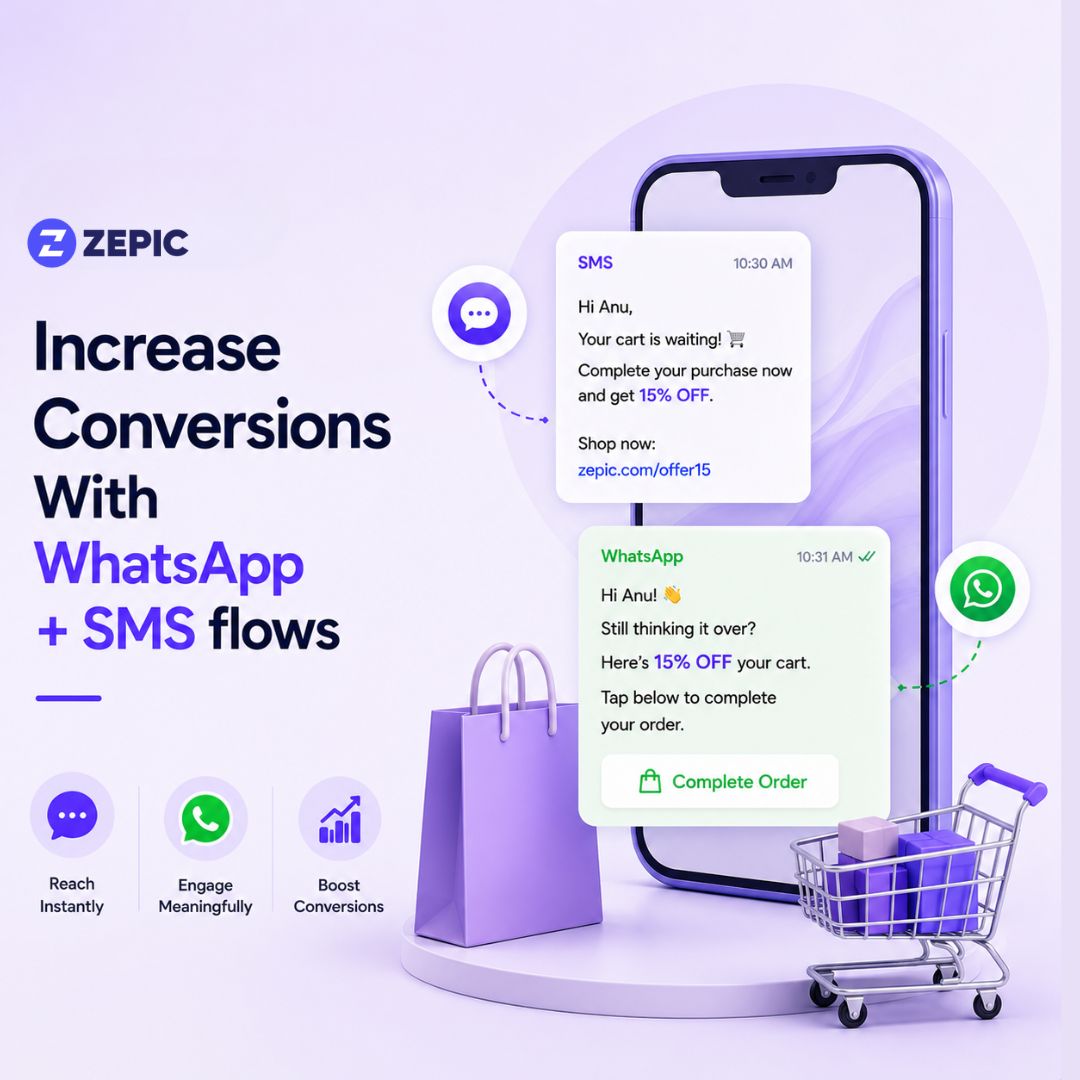
- Abandoned cart campaigns perform best with a WhatsApp reminder first, followed by an incentive, and finally an SMS reminder if the purchase is still incomplete.
- Collect separate opt-ins for SMS and WhatsApp, provide easy opt-outs, and respect messaging frequency limits.
- Monitor performance using sequence-level conversions, unread WhatsApp rates, opt-out rates, and overall campaign revenue rather than evaluating each channel independently.
Which channel do you use to send promotional blasts or cart reminders?
Most of you would’ve answered WhatsApp OR SMS
This either/or mindset is where many marketing teams hit a growth ceiling. Brands often treat mobile communication as a binary choice. They invest exclusively in one platform while ignoring the other. But this approach creates operational gaps because a single channel cannot handle every phase of the customer journey.
Text messages have open rates as high as 98%. However, you are restricted to 160 plain-text characters without images, interactive buttons, or product catalogs.
WhatsApp, on the other hand, allows you to send rich product carousels and quick-reply menus. Yet, you have to navigate Meta's strict message caps.
Instead of choosing one over the other, you should try using them together.
When you combine these platforms into a single sequence, you can eliminate delivery blind spots, and might even be able to increase conversions by 20%
Let’s find out how.
Why Combining Channels Creates a Multiplier Effect
Using both channels in a coordinated workflow allows you to capture revenue that would normally slip through the cracks. This hybrid strategy yields a 20% conversion boost due to three specific pillars.
1. The Automated Failover Security Net
Data connectivity fluctuates constantly. When you send a time-sensitive marketing broadcast only on WhatsApp, users who are traveling or in low-signal areas will miss it. If you set up an automated failover rule, your system can detect when a WhatsApp message is undelivered or unopened after a specific period. It then automatically deploys an SMS variant. This ensures 100% message visibility for critical revenue events.
2. Reduced Audience Fatigue
Flooding a single platform with repetitive messages causes users to opt-out or block your profile. Distributing your communication across two distinct touchpoints prevents channel fatigue. A user might find three WhatsApp messages in 24 hours intrusive, but one interactive WhatsApp message followed by a concise SMS text reminder feels natural and helpful.
3. Alignment with Customer Behavioral Preferences
Some buyers prefer the friction-free, media-heavy nature of WhatsApp for browsing new products. Others prefer a simple text link that they can bookmark and open later on a desktop browser. A dual-channel ecosystem adapts to how individual segments prefer to interact with your business.
4 Strategic SMS + WhatsApp workflows to Boost Conversions
Let us look at four specific blueprints that combine SMS and WhatsApp into single automated customer journeys.
1. The High-Conversion Abandoned Cart Recovery Sequence
Most cart abandonment workflows rely on email, which often goes straight to the promotions tab, and thanks to the latest Gmail Gemini update, it has become difficult to gain visibility in your customer’s inbox.
Creating an SMS plus WhatsApp workflow can increase your odds of getting noticed.
- Trigger: Customer adds items to their online cart but fails to complete the purchase within 15 minutes.
- Step 1 (Minute 30): Send a WhatsApp message featuring a high-quality image of the abandoned item. Include a clear "Complete My Order" quick-reply button that links directly to their populated checkout screen.
- Step 2 (Hour 4): If the first message did not result in a purchase, send a second WhatsApp message offering a limited-time incentive, such as free shipping or a 10% discount code. Use an interactive countdown element or explicit language emphasizing the offer expiration.
- Step 3 (Hour 24): If the user has still not completed the purchase, or if the previous WhatsApp messages went unread because the user turned off their cellular data, send a final SMS reminder.
SMS Example: "Hi Alex, your cart items are selling out fast. Use code SHIPTODAY at checkout to get free shipping. Click here to claim: [Link]"
2. The Post-Purchase Nurture and Cross-Sell Sequence
The period immediately after a purchase is when customer engagement is at its highest point. This is the right time to upsell or cross-sell.
- Trigger: Customer completes a checkout transaction on your website.
- Step 1 (Immediate): Send an automated WhatsApp utility message containing the order confirmation, invoice download link, and a customer support quick-reply button. This establishes your WhatsApp thread as a trusted resource.
- Step 2 (Day of Delivery): Send a message confirming the package has arrived. Include a button that says "Rate Your Product" or "Get Tips On Use."
- Step 3 (Day 10): Review what the customer purchased. If they bought a coffee machine, send an SMS offering a discount on compatible coffee pods. Use SMS here because it stands out from previous shipping updates.
SMS Example: "Hi Sarah, we hope you love your new espresso maker. Stock up on your first batch of organic pods with 15% off today: [Link]"
3. The Urgency-Driven Flash Sale Strategy
Flash sales require immediate action. If your audience does not open your notification within the first few hours, the whole promotion loses it’s meaning
- Trigger: Launch of a 24-hour promotional campaign.
- Step 1 (Morning of Sale): Send a rich broadcast to your opted-in subscriber base. Feature a carousel of your top discounted items along with "Buy Now" buttons. This generates initial traffic and browse data.
- Step 2 (Last 3 Hours): Look at your campaign data to isolate subscribers who have not purchased yet. Send an urgent SMS text blast to this specific group.
Example: FLASH SALE: Only 3 hours left to get 40% off sitewide. Orders close at midnight. Shop the final items now: [Link]"
4. The Customer Support to Conversational Commerce Transition
When customers reach out with questions, they are actively considering a purchase. You can guide them through the sales funnel by routing them from a simple text to an interactive chat space.
- Trigger: Customer encounters an issue on a mobile-unfriendly page or loses internet access and texts a keyword to your dedicated SMS shortcode.
- Step 1 (Immediate): Respond via SMS to ensure instant receipt. Include a link that opens directly into a WhatsApp chat window. "Thanks for reaching out! Let's get this sorted quickly. Click this link to chat directly with our product expert on WhatsApp: [Link]"
- Step 2 (Inside WhatsApp): Automated Selection Menu. Once the customer clicks into WhatsApp, present them with an immediate automated list menu detailing common solutions or product recommendations. This allows them to self-serve or talk to a live sales representative who can close the deal.
Setting Up Technical Logic and Workflow Routing
To achieve a 20% conversion boost without escalating your software costs, you must configure smart routing rules within your customer engagement platform.
Step-by-Step Logic Integration
- Create a Unified Customer Profile: Ensure your Customer Data Platform (CDP) or CRM binds the customer's phone number to both their SMS subscription status and WhatsApp opt-in status.
- Define the Primary Channel Based on Region and Cost: For markets like Latin America, India, and parts of Europe, designate WhatsApp as your primary channel. For North American markets, where SMS usage dominates and WhatsApp adoption is lower, set SMS as your primary touchpoint.
- Configure Delivery and Read Receipts as Triggers: Modern APIs provide instant status callbacks. You can program your marketing stack to listen for specific states: Delivered, Sent, Read, or Failed.
- Set Up a Time-Based Delay Trigger: Never send an SMS and a WhatsApp message at the exact same moment. Establish a delay threshold, usually between 2 to 4 hours, to allow the consumer to open the primary message before the secondary channel initiates a backup text.
Best Practices for Compliance and Frequency Management
Operating on mobile devices means entering a highly personal space. Mismanaging your communication frequency will result in high opt-out rates, spam reports, or account suspension from Meta.
Securing Legal Consent
You must collect independent opt-ins for both communication methods. A user checking a box to receive SMS updates does not give you permission to send them marketing messages on WhatsApp.
- Clear Disclosures: Update your checkout and signup forms to include distinct checkboxes. For example, use separate lines for "Opt-in to SMS alerts" and "Opt-in to WhatsApp offers."
- Double Opt-In Mechanics: When a user signs up for your WhatsApp channel, send an initial automated template asking them to confirm by clicking a "Confirm Subscription" button.
Offering Frictionless Opt-Outs
Retaining unengaged users who actively ignore your messages damages your sender reputation and costs money. Make it simple for users to leave your list.
- For SMS: Always include standard opt-out keywords at the end of promotional messages, such as "Reply STOP to opt out."
- For WhatsApp: Utilize Meta's native "Block" or "Opt-out" button options in your message templates. If a user types phrases like "Stop texting me" or "Unsubscribe," configure your AI or automated keyword router to immediately remove them from future marketing broadcasts.
Managing Message Frequency Capping
Set strict rules within your automation platform to prevent message overlapping.
- Limit marketing broadcasts to a maximum of 2 per week per customer across both channels combined.
- Prioritize utility messages (shipping updates, account alerts) over promotional content. If a transactional SMS is triggered on the same day as a marketing WhatsApp broadcast, hold back the marketing message for 24 hours.
- Respect geographic time zones. Ensure your system blocks any automated outbound marketing messages between 8:00 PM and 9:00 AM in the recipient's local time.
KPIs and Metrics to Monitor
To verify that your hybrid strategy is delivering the target 20% conversion increase, you must monitor specific metrics across both channels.
1. Attributed Conversion Rate Per Sequence
Track the revenue generated from individual flows rather than looking at individual channel performance in isolation. Calculate this by dividing the total number of conversions completed via either the WhatsApp link or the fallback SMS link by the total number of entries into that automated sequence.
2. Message Read/Open Discrepancy
Monitor the percentage of WhatsApp messages that remain unread after the 3-hour mark. If this number rises above 40%, it indicates your target audience is either offline or experiencing app fatigue. This serves as your signal to adjust your fallback timeline or alter your content approach.
3. Opt-Out and Block Rates
Keep a close eye on your opt-out rates. A standard, healthy opt-out rate is below 1% per campaign. If your combined sequence pushes past this threshold, your message timing is too aggressive, or your content is lacking clear value.
Building Your First Hybrid Workflow
Bringing these two tools together does not require a complete overhaul of your marketing infrastructure. Begin small by selecting your highest-traffic sequence, which is typically your abandoned cart flow. Set up a simple two-step rule where WhatsApp acts as the initial rich media engagement tool and SMS functions as the urgent text-only closer. Inspect your analytics after two weeks, adjust the delay windows based on real user response times, and scale the logic across the rest of your customer lifecycles.
Your trump card to increasing conversions with this cross-channel strategy is choosing the right marketing automation platform that can support both.
ZEPIC can help you nail your SMS and WhatsApp workflows. Talk to our team for more information.
Frequently Asked Questions
Is it better to use SMS or WhatsApp for business marketing?
Neither channel is universally superior because they serve different communication purposes. SMS is ideal for urgent, text-based alerts that must reach customers instantly without requiring an internet connection. WhatsApp is better suited for rich media campaigns, interactive experiences, and two-way customer conversations. Using both channels together allows businesses to leverage the strengths of each platform.
How do you automatically switch from WhatsApp to SMS if a message fails?
Businesses can configure automated fallback messaging using a multichannel marketing automation platform or communication API. The system first attempts delivery through WhatsApp, monitors the delivery status using real-time webhooks, and automatically sends an SMS if the message remains unread or undelivered after a predefined period, such as two hours.
Is marketing through WhatsApp cheaper than sending standard SMS?
Cost depends on your region and campaign type. WhatsApp uses a pricing model based on conversation windows, allowing multiple interactions within a billing period. SMS is typically billed per 160-character message segment. For media-rich conversations and international campaigns, WhatsApp is often more cost-effective, while SMS remains competitive for short transactional messages.
Do I need separate opt-in permissions for SMS and WhatsApp marketing?
Yes. Regulations such as GDPR and TCPA require businesses to obtain separate, explicit consent for each communication channel. Permission to receive SMS marketing does not automatically authorize WhatsApp marketing. Businesses should provide individual opt-in checkboxes so customers can choose their preferred channels.
What are the main character and media limits for WhatsApp versus SMS?
SMS supports up to 160 plain-text characters per message segment and does not natively support images, videos, or interactive elements. WhatsApp supports message templates up to 1,024 characters and allows businesses to include images, videos, PDFs, audio files, quick reply buttons, and interactive product lists.
Can I use the same phone number for both SMS and WhatsApp business accounts?
Yes. A single business phone number can be used for both standard SMS messaging and the WhatsApp Business API. Using one consistent number strengthens brand recognition and provides customers with a unified communication experience across channels.
How often should I send marketing messages across these two channels?
To minimize subscriber fatigue and reduce opt-outs, businesses should limit promotional messaging to no more than two broadcasts per week across SMS and WhatsApp combined. Marketing campaigns should also be paused whenever important transactional messages, such as shipping updates or appointment confirmations, are being delivered.
Which industries benefit the most from a combined SMS and WhatsApp strategy?
Many industries benefit from combining SMS and WhatsApp, particularly ecommerce and retail for cart recovery and order updates, travel and hospitality for booking confirmations and itinerary changes, logistics for delivery notifications, and professional services for appointment reminders, intake forms, and customer communication.





%201.png)


.png)