Instagram comment-to-DM funnels eliminate the friction of sending users from a post to a bio link and then to a product page.
Successful funnels start with a single goal, such as driving sales, collecting leads, promoting a flash sale, or running a giveaway.
The trigger type matters: keywords, story replies, comments, and emoji triggers each serve different levels of buyer intent.
Reels, carousels, Stories, and strong CTAs are the most effective content formats for generating comments and activating funnels.
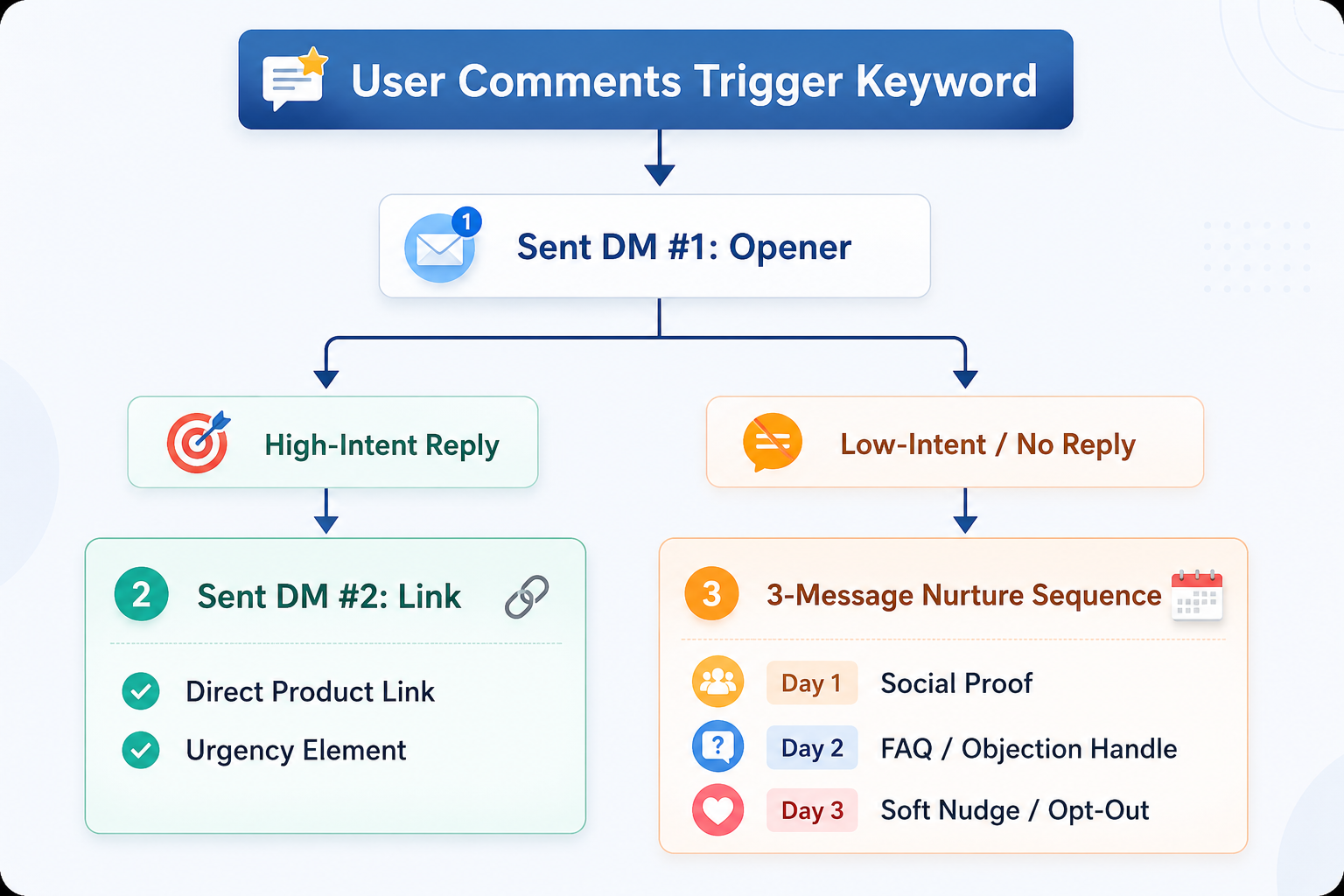
The first automated DM should start a conversation rather than immediately sending a link, which can hurt engagement and trigger spam filters.
High-intent users should receive product links quickly, while lower-intent users should enter a nurture sequence with social proof and FAQs.
Personalization, qualification questions, and follow-up messages significantly improve conversion rates.
Brands should track trigger rate, DM reply rate, click-through rate, post-to-purchase rate, and revenue per DM to measure success.
A well-optimized comment-to-DM funnel can achieve post-to-purchase conversion rates above 4%, outperforming typical eCommerce conversion benchmarks.
For years, eCommerce brands have relied on a highly flawed conversion journey on social media. You create an engaging Reel and direct interested users to a link in your bio.
This traditional approach introduces massive friction into the buyer journey. To buy a product, a customer must stop scrolling, leave their feed, click your brand profile, open the landing page menu, and manually search for the item they saw.
Industry data from organizations such as the Marketing Science Institute indicate that each additional step or click in a consumer purchase path can reduce conversion rates by up to 17%.
This friction leaves brands with high engagement metrics but low actual revenue.
You can solve that specific leakage point by deploying Instagram comment-to-DM automation. Instead of forcing your audience to leave their active feed, you bring the storefront directly to their inbox the exact moment they show interest.
To see how this system fixes the traditional social commerce problem, consider this scenario:
9:00 AM: Your brand publishes an organic Reel showcasing a core product. The caption instructs users to comment with a specific keyword to get access.
11:00 AM: The post gathers 312 comments. The automation engine instantly delivers 312 tailored messages directly to those specific inboxes.
End of Day: The workflow processes 37 completed purchases with zero manual message monitoring from your team.
This automated strategy delivers a 4.4% post-to-purchase conversion rate. Standard online store conversion rates typically hover around 2% according to global benchmarks from Shopify.
That’s how an Instagram comment-to-DM funnel eCommerce framework can transform passive social media engagement into a predictable sales pipeline. This playbook covers every configuration, conversation template, and operational guardrail required to build this system for your storefront.
Before You Build: The 3 Decisions That Determine Whether Your Funnel Converts or Flops
Many digital storefronts deploy Instagram DM automation tools without structural planning, which routinely hurts conversion rates. To build a highly effective Instagram comment-to-DM funnel eCommerce ecosystem, you must finalize three strategic decisions before configuring any software.
1: Pick One Goal Per Funnel
Mixing objectives confuses users and dilutes your metrics. Every automated workflow must focus on a single, clear outcome:
Product Sale or Discovery: Directing users to a specific product page or curated collection to drive immediate revenue.
Email or Lead Capture: Exchanging an incentive for user contact information to grow your owned marketing databases.
Flash Sale or Limited-Time Offer: Capitalizing on real-time urgency to clear inventory or spark sudden revenue spikes.
Giveaway Entry: Boosting organic reach while capturing warm leads for subsequent marketing efforts.
2: Choose Your Trigger Type
The entry point of your Instagram DM funnel for sales dictates how you structure the subsequent conversation. Use the following breakdown to align user behavior with intent:
3: Map the Exit Action
Determine exactly where a customer should land once they click your automated direct message links.
For standard retail items, send users directly to a pre-loaded shopping cart or an optimized product page.
For high-ticket items or customized products, transition the user into a dedicated communication channel like WhatsApp for high-touch purchase support.
For long-term nurturing campaigns, guide them to a dedicated landing page to collect their email address before presenting a commercial offer.
How to Build an Effective Instagram Comment to DM
Step 1: Build Content That Makes People Want to Comment
The basic foundation of an automated comment-to-DM strategy for Instagram is content that reliably inspires comments. If your audience does not engage with your posts, your automated workflows will never activate.
A. The Caption Formula That Drives Keyword Comments
An effective caption relies on a reliable three-part architecture: Hook, Context, and Call to Action (CTA). Your CTA must state exactly what the user needs to type and what they will receive in return.
Strong, Clear CTA Example:"We just restocked the leather tote bag everyone has been asking about. Comment RESTOCK below, and I will instantly DM you the private shopping link before it sells out again."
Weak CTA Example:"Comment below to learn more about our new arrivals!"
The weak example fails because it lacks a specific keyword trigger, fails to communicate an explicit benefit, and creates unnecessary friction for the shopper.
If you have an Instagram DM automation tool that can recognize intent from the comment, you don’t have to stick to rigid keywords.
B. Content Formats Ranked by Comment Volume
To maximize your funnel performance, focus your content creation efforts on the formats that naturally invite user interaction:
Instagram Reels: Offers the highest organic reach and comment velocity across the platform. Reels serve as the ideal entry point for cold audience acquisition.
Carousels: The final slide offers an excellent opportunity to feature a clear CTA. Carousels capture deliberate, high-intent comments from users who took the time to swipe through your content.
Feed Posts: While these deliver lower algorithmic reach, they engage your warmest, most loyal followers who already trust your brand.
Stories with Reply Triggers: This format delivers high conversion intent because users are responding directly to temporary, in-the-moment content.
C. On-Screen Reinforcement
Never rely solely on your caption to communicate your keyword trigger. Many social media users browse feeds with their audio turned off and rarely expand long captions.
Text Overlays: Add high-contrast text directly onto your video reels (e.g., "Comment DROP for early access").
Pinned Comments: Write a brief comment from your brand's account repeating the exact keyword trigger, and pin it to the top of the comment section. This acts as immediate social proof and provides a secondary call to action for anyone viewing the post.
Step 2: Set Up Your Keyword Trigger
Setting up your Instagram keyword trigger DM parameters properly ensures that your automated system operates reliably during high-traffic windows.
Method
Friction
Data Depth
Real-Time Response
Context Richness
Web Chat / Chatbot
Low
High
Yes
Rich
Quiz / Survey
Medium
Medium
No
Limited
Preference Center
Medium
High
No
Moderate
Post-Purchase Form
Low
Low
No
Limited
Account Sign-Up
High
High
No
Moderate
A. Keyword Selection Rules
Keep your trigger words simple, intuitive, and mobile-friendly:
Limit triggers to 1 to 3 words maximum to minimize user typos.
Instruct users to use ALL-CAPS in your marketing text. This makes the trigger phrase stand out visually in a busy comment section and clearly reads like a special activation code.
Match your chosen keyword directly to the intent of your post.
B. Per-Post vs. Global Triggers
You can configure your automation workflows in two distinct ways:
Per-Post Automation: This model links a specific keyword to one designated piece of content. It is ideal for distinct product launches, seasonal campaigns, and time-sensitive offers.
Global Automation: This model monitors your entire profile, triggering a standardized flow whenever a specific keyword is left on any post. It works well for always-on product discovery and general inquiries.
When evaluating your automation needs, consider moving beyond static, rigid keyword rules. Advanced tools utilize contextual understanding to recognize user needs even when typos occur.
C. Trigger Testing Checklist
Before launching your campaign to the public, use this checklist to verify your settings:
[ ] Ensure automation is toggled to ON within your platform interface.
[ ] Confirm your Instagram profile is configured as a Business or Creator account.
[ ] Verify the keyword spelling matches across your graphics, caption, and automation settings.
[ ] Test the trigger from an unrelated personal account; the initial DM should land within 5 to 10 seconds.
[ ] Tap every link within your test direct messages to ensure your web destinations load correctly.
Step 3: Write Your Instagram DM Sequence
The biggest mistake brands make with an Instagram auto DM eCommerce strategy is dropping a raw URL into the very first message.
The Cardinal Rule of DM Automation: Never include a link in your first automated response. Instead, open with an engaging qualification question and deliver the link in message number two. Dropping external links in initial messages can trigger platform spam filters and risk account restrictions.
Message 1: The Opener
Your primary goal here is to acknowledge the user's request, introduce your brand personality, and qualify their purchase intent.
Template A: Standard Product Sale
"Hey [First_Name]! 👋 Got your message. We have your link ready to go! Quick question before you check it out: are you shopping for yourself or looking for a gift? (Just want to make sure we point you toward the right options 🙌)"
Template B: Flash Sale Campaign
"Hey [First_Name]! The flash sale is officially live. ⚡ Before we send over the link, are you looking closely at [Product A] or [Product B]? Stock is moving fast today, so we want to make sure we guide you to the right collection page!
Template C: Lead Magnet Content
"Your product guide is ready to view! 🎉 One quick thing: reply with your preferred email address below, and we will send a full copy straight to your inbox too, just so you never lose track of it in your DMs!"
Message 2: The Conversion Message
Once the customer responds to your initial question, deliver the link alongside a clear statement that addresses common buying hesitations.
Template: Product Sale (High-Intent Track) "Perfect choice! Here is your direct link to shop the collection: [Shop Link]
Just an absolute heads-up: we only have a few units left of this batch, and we ship out same-day for all orders placed before 3:00 PM. Let us know if you need any quick help with sizing or returns! 🙌"
Message 3: The 24-Hour Follow-Up
Re-engage users who opened your links but did not complete their checkout, keeping your tone helpful rather than pushy.
Template: 24-Hour Automated Re-engagement
"Hey! Just checking back in. Did you have a chance to look over those items? I am happy to answer any questions you have about our materials, sizing, or shipping options if you are still making up your mind! 😊"
To maintain account safety, always prepare 3 to 5 text variants for every automated template. Sending the same string of text to hundreds of users over a short period can flag Instagram's automated spam detection systems. Randomizing a few introductory phrases keeps your messaging safe and compliant.
Step 4: Build the Qualification Split
Shoppers exhibit different levels of buying intent. Implementing a bifurcated conversation system helps maximize your comment-to-DM funnel conversion rate.
The High-Intent Route
User Action: The customer answers your initial question clearly (e.g., "Shopping for myself"), asks about pricing, or requests immediate checkout access.
System Response: Deliver Message 2 immediately. Provide the direct product page link alongside a clear value proposition like free shipping or a limited stock notice.
The Low-Intent Route
User Action: The shopper provides a vague response, expresses hesitation, or stops replying altogether for more than two hours.
System Response: Route the user into a structured, three-part nurturing sequence designed to build consumer trust over time:
Measuring the Funnel: The Only 5 Metrics That Matter
Do not get distracted by standard vanity metrics like views or likes. To properly evaluate and improve your Instagram sales funnel automation performance, track these five key metrics:
1. Trigger Rate
Formula: Comments Receiving an Automated DM/Total Comments on Trigger Post
Performance Target:95% or higher
Optimization Advice: If this rate drops below 95%, verify that your automation workflow is active, ensure your platform API connection is stable, and confirm that users are spelling the keyword correctly.
2. DM Reply Rate
Formula: Replies to DM /Total Initial DMs Sent
Performance Target:30% to 50%
Optimization Advice: If your reply rate drops below 20%, your initial question might feel too rigid or impersonal. Adjust your copy to make the opening question feel like a natural conversation.
3. Link Click-Through Rate (CTR)
Formula: Unique Link Clicks/Total DMs Sent
Performance Target:20% to 35%
Optimization Advice: If your CTR is lower than 15%, check to see if your store link is buried inside too much text in the message. Place your link near the top of the message and verify that the destination page aligns with the promise made in your social post.
4. Post-to-Purchase Rate
Formula: Completed Purchases From Funnel/Total Comments on Trigger Post
Performance Benchmark:4% or higher with an optimized sequence (compared to the standard 2% industry baseline).
Optimization Advice: If you are generating plenty of clicks but very few purchases, analyze the shopping experience on your website. Ensure your site loads quickly and that the checkout process is smooth and frictionless.
5. Revenue Per DM (RPD)
Formula: Total Attribution Revenue From Funnel/Total Automated DMs Sent
Performance Use Case: This metric acts as your ultimate guide for scaling. A high and steady revenue per DM gives you the green light to increase your content volume or invest ad spend into boosting that specific post to drive more comments and sales.
The Difference Between a Broadcast and a Funnel
Traditional brand profiles often use social media as a one-way broadcasting tool to push messages out to an audience. Implementing a structured Instagram direct message marketing funnel changes that dynamic entirely, allowing your brand to build active, two-way conversations with your community.
With this approach, every piece of content you publish turns into a round-the-clock sales assistant. Your comment section functions as an easy lead-capture form, and your direct message inbox becomes a highly effective conversion channel for your store.
With ZEPIC's advanced Instagram automation engine alongside built-in AI intent detection capabilities, your store can look past strict keyword matches. The platform evaluates the underlying intent of customer comments, transforming standard post engagement into automated, personalized sales conversations.
Is Instagram comment-to-DM automation against Meta's rules?
No. Instagram comment-to-DM automation is compliant when implemented through Meta-approved platforms that connect via the official Instagram Graph API. Businesses should avoid unauthorized tools that require account passwords or browser scraping, as these methods can violate Meta's policies and put accounts at risk.
What keyword triggers work best for Instagram DM funnels?
Short, clear, action-oriented keywords typically perform best. Examples include words like SHOP, GUIDE, DEAL, DROP, and BACK. Simple keywords reduce typing errors and make it easier for users to participate, especially on mobile devices.
How do I set up a comment-to-DM flow on Instagram?
Start by switching your Instagram profile to a Business or Creator account. Connect the account to an approved automation platform, create your messaging flow, configure the keyword triggers that will activate the automation, and publish the workflow. Once enabled, users who comment with the selected keyword will automatically receive a direct message.
How many Instagram DMs per hour can I safely send via Instagram automation?
To maintain account health and avoid triggering spam detection systems, businesses should keep automated DM volumes within conservative limits and vary message copy when possible. Following Meta's platform guidelines and focusing on engaged users helps maintain deliverability and account safety.
Can comment-to-DM funnels work for Reels and Stories too?
Yes. Comment-to-DM automation can be used across Reels and Stories. Reels are highly effective for reaching new audiences and generating inbound engagement, while Story reply triggers work well for engaging existing followers and supporting time-sensitive campaigns, promotions, and product launches.




.png)

%201.png)


.png)